
Most technical SEO checklists hand you 50 items and treat them as equals. Real sites don't break that way. One stray line in robots.txt can hide every page you own, while a missing alt attribute barely registers.
This checklist is ranked by damage. Every check carries a priority tag, a test you can run with free tools, and a clear "pass when" line, so you know when you are done. Thresholds come from Google's own documentation, checked in November 2026.
The audience has grown, too. Your pages are now read by Googlebot, Bingbot and a wave of AI crawlers from OpenAI, Anthropic and Perplexity. They all depend on the same foundations, and most of the AI crawlers can't run JavaScript at all.
Inside this checklist:
- 67 checks across 10 areas, each tagged P1, P2 or P3
- How to test each one, and what passing looks like
- Cheat sheets for status codes, Page indexing statuses and AI crawlers
- Extra checks for SaaS, ecommerce and content sites
- A migration checklist, a prioritization matrix and a one-page summary table for your audit sheet
How to use this checklist
Work through the areas in order. Each one depends on the one before it: a page that can't be crawled can't be indexed, and a page that is never indexed can't rank, however fast it loads.
- Crawl access: can bots reach the site and get clean responses?
- XML sitemaps: can they discover every URL you care about?
- Indexing controls: is the right version of each page in the index?
- Rendering: do bots see the same content users see?
- Architecture: do your links and URLs make the site easy to crawl and understand?
- Page experience: is it fast, stable and secure?
- Structured data: can machines read what each page is about?
- International: does each market get the right version?
- Images and video: can media be found, and does it load fast?
- AI search: can AI crawlers read and cite your pages?
Priority tags
| Tag | What it means | When to fix |
|---|---|---|
| P1 | Blocks crawling or indexing of pages that matter | Now, before anything else |
| P2 | Weakens rankings, rich results or crawl efficiency | This sprint or this month |
| P3 | Small or indirect gains | Batch it with other dev work |
The toolkit (free tools first)
| Tool | Use it for | Cost |
|---|---|---|
| Google Search Console | Page indexing, Crawl stats, URL Inspection, Core Web Vitals, robots.txt report, Manual actions, Generative AI performance | Free |
| Bing Webmaster Tools | Bing index coverage, Site Scan, IndexNow, AI Performance (Copilot citations) | Free |
| Screaming Frog SEO Spider or Sitebulb | Full-site crawl: status codes, redirects, canonicals, directives, internal links | Screaming Frog is free up to 500 URLs |
| PageSpeed Insights | Real-user (CrUX) and lab data for Core Web Vitals | Free |
| Rich Results Test and Schema Markup Validator | Rich result eligibility and schema syntax | Free |
| Server or CDN logs | What bots actually request, how often, and what they get back | Depends on your host |
Record a baseline before you touch anything
You will want to prove the impact of your fixes later. Write these numbers down first:
- Indexed and not-indexed pages (Search Console > Indexing > Pages)
- Clicks and impressions for the last three months (Performance report)
- Impressions in Google's AI features (Generative AI performance report) and Copilot citations (Bing's AI Performance report)
- Share of URLs rated Good for Core Web Vitals, on mobile and desktop
- Average crawl requests per day and average response time (Settings > Crawl stats)
- Counts of 4xx, 5xx and redirected URLs from your crawler
Every check below uses the same format: why it matters, how to check it, and when it passes.
1. Crawl access: can bots reach your pages?
If crawlers can't fetch a page, nothing else in this checklist matters. Start here, and fix every P1 before you move on.
1.1 robots.txt loads cleanly and blocks only what it should P1
One leftover Disallow: / from a staging site can hide an entire domain. A broken file is just as risky: per Google's robots.txt documentation, a 5xx response makes Google stop crawling the site for up to 12 hours, then fall back on a cached copy for 30 days.
- How to check: Open yourdomain.com/robots.txt, then Search Console > Settings > robots.txt report to see what Google fetched and when. Run your crawler with robots.txt respected and compare the blocked URLs against your sitemap.
- Pass when: The file returns 200, stays under Google's 500 KiB limit, blocks only low-value areas (internal search, cart, admin, filter parameters), and never blocks the CSS or JavaScript your pages need to render.
1.2 robots.txt is not used to keep pages out of Google P1
robots.txt controls crawling, not indexing. Google can still index a blocked URL from links alone, and it will never see a noindex tag on a page it isn't allowed to fetch (Google on blocking indexing).
- How to check: Look for "Indexed, though blocked by robots.txt" in the Page indexing report.
- Pass when: Pages you want out of search are crawlable and carry
noindex(meta tag, orX-Robots-Tagheader for PDFs and other files). robots.txt is reserved for URLs you never want crawled. Remember that Google ignoresnoindexandcrawl-delaylines inside robots.txt.
1.3 The server answers reliably and quickly P1
Google's crawlers slow down when they see 5xx or 429 responses, and URLs that keep failing are eventually dropped from the index (Google on HTTP status codes).
- How to check: Search Console > Settings > Crawl stats. Review Host status (robots.txt fetch, DNS, server connectivity), the "By response" breakdown, and average response time. Add uptime monitoring with alerts.
- Pass when: Host status shows no recent problems, server errors are rare and not trending up, and response time is stable after deploys and traffic spikes.
1.4 Every URL returns the status code it should P1
Wrong status codes are the quietest way to lose pages. Use this cheat sheet when you review your crawl.
| Situation | Correct response | Common mistake |
|---|---|---|
| Live page | 200 | Error page that still returns 200 (a soft 404) |
| Permanent move | 301 or 308 | A 302 left in place for months |
| Temporary move or test | 302 or 307 | Using 301 for a short swap |
| Removed, no replacement | 404 or 410 | Redirecting every dead URL to the homepage |
| Planned downtime | 503 for a short window | A 200 "we'll be back" page |
| Too many bot requests | 429 (Google slows down) | 401 or 403, which Google does not treat as a slow-down signal |
| Private or logged-in area | 401 or 403 | A login wall on pages you want indexed |
- How to check: Crawl the site, filter by status code, and check the Soft 404 and Server error (5xx) rows in the Page indexing report.
- Pass when: No internal links point to 4xx or 5xx URLs, important pages have no soft 404s, and no temporary redirect has quietly become permanent.
1.5 Redirects are one hop and loop-free P2
Google follows up to 10 redirect hops and treats 301 and 308 as strong signals, so chains are less about leaking value than people think. The real costs are slower pages for users and wasted crawl requests, which Google lists as a crawl-efficiency problem.
- How to check: Your crawler's redirect chain report, plus a filter for internal links that point at redirecting URLs.
- Pass when: Every redirect lands on a final 200 URL in one hop, internal links point straight to final URLs, and no permanent move relies on JavaScript or meta refresh.
1.6 Crawl budget is under control P2large sites only
Most sites can skip this. Google's crawl budget guide targets sites with 1 million+ pages that change weekly, 10,000+ pages that change daily, or a large share of URLs stuck in "Discovered, currently not indexed."
- How to check: Crawl stats "By purpose" and "By response", the Discovered row in Page indexing, and your logs.
- Pass when: Bots spend most requests on canonical, indexable URLs, filter and parameter traps are blocked, removed pages return 404 or 410, and the server supports
304 Not Modified. Don't usenoindexto save crawl budget: Google still has to fetch the page to see it.
1.7 HTML stays well under Googlebot's 2MB fetch limit P2
This one changed in 2026. Google's documentation now states that Googlebot fetches only the first 2MB of an HTML file (uncompressed) and the first 64MB of a PDF. Anything after the cutoff is ignored, as Google explains in its March 2026 deep dive on crawling.
- How to check: Add the size column in your crawler and sort descending. On the heaviest templates, look for inline base64 images, huge inline scripts or styles, and mega-menus at the top of the source.
- Pass when: Raw HTML is far below 2MB, main content and JSON-LD appear early in the source, and images, CSS and JavaScript load as separate files (each file gets its own limit).
1.8 Server logs confirm what bots actually do P3P2 for large sites
Search Console shows samples. Your access logs show every request, including AI crawlers that never appear in Google's tools. Verify Googlebot by reverse DNS or Google's published IP ranges, because its user agent is often spoofed.
- How to check: Pull 30 days of server or CDN logs, filter verified search and AI bots, and compare the URLs they hit against your sitemap.
- Pass when: Key templates are crawled regularly, little bot activity goes to parameters, redirects or 404s, and you know which AI crawlers visit and how often.
2. XML sitemaps: can bots find every page you care about?
A sitemap is a hint, not a command. Google's sitemap documentation says submitting one is "merely a hint", but it is still the quickest way to tell search engines which URLs matter and when they changed.
2.1 A sitemap exists and search engines know where it is P2
- How to check: Open yourdomain.com/sitemap.xml (or your sitemap index), then Search Console > Indexing > Sitemaps and the Sitemaps section of Bing Webmaster Tools.
- Pass when: The sitemap is submitted in both tools with a Success status and a recent read date, and robots.txt carries a
Sitemap:line with the full absolute URL.
2.2 It lists only canonical, indexable, 200 URLs P2
Google treats sitemap inclusion as a weak canonical signal. Every redirect, 404, noindex page or duplicate you list sends a mixed message and wastes a crawl.
- How to check: Crawl the sitemap in list mode (Screaming Frog: Mode > List > Download XML Sitemap) and filter for non-200 responses,
noindex, and URLs that canonicalize elsewhere. - Pass when: Every listed URL returns 200, is self-canonical and indexable, and uses HTTPS.
2.3 Files respect the limits and are split by type P3
Google caps each sitemap at 50,000 URLs or 50MB uncompressed. Larger sites need a sitemap index, UTF-8 encoding and absolute URLs.
- How to check: Count URLs per file and check file sizes.
- Pass when: No file exceeds either limit, and content types live in separate sitemaps (pages, blog, products, docs). Splitting lets you see indexing rates by section instead of one blended number.
2.4 lastmod tells the truth P3
Google ignores <priority> and <changefreq>. It uses <lastmod> only when the date is "consistently and verifiably" accurate, so a date that changes on every deploy trains Google to ignore it.
- How to check: Compare
lastmodvalues against real edit dates on a sample of pages. - Pass when:
lastmodchanges only after a significant update to the main content, structured data or links. A new copyright year in the footer does not count.
2.5 Submitted vs indexed is tracked per sitemap P2
- How to check: In the Sitemaps report, open a sitemap and select "See page indexing" to get indexed and not-indexed counts for just those URLs.
- Pass when: Your key sitemaps show a stable or rising indexed share, and every drop is traced with the Page indexing triage in section 3.
One housekeeping note: Google deprecated its old sitemap "ping" endpoint in 2023. Submit through Search Console or robots.txt, and use IndexNow for Bing (check 10.6).
3. Indexing controls: is the right version of each page in Google?
Google's own Page indexing report help says: "Don't expect every URL on your site to be indexed." Your job is narrower and more important: make sure the pages that earn traffic are indexed, in the version you chose.
3.1 No accidental noindex on pages that should rank P1
A noindex left over from staging, a CMS setting or a misfiring plugin is the most common self-inflicted deindexing. In WordPress, check that "Discourage search engines from indexing this site" is off in production.
- How to check: Crawl and filter for
noindexin both the meta robots tag and theX-Robots-Tagheader. Then review the "Excluded by 'noindex' tag" row in Page indexing. - Pass when: Only pages you deliberately keep out carry
noindex: thank-you pages, internal search results, thin archives, staging copies.
3.2 Canonical tags are present, absolute and consistent P1
rel="canonical" is a strong signal, but Google makes the final call. When your canonical, sitemap and internal links disagree, Google picks its own version (Google on consolidating duplicates).
<link rel="canonical" href="https://www.example.com/technical-seo-checklist/" />
- How to check: Your crawler's canonical report. Filter for missing canonicals, relative URLs, more than one canonical, and canonicals that point to redirects, 404s or
noindexpages. On JavaScript sites, confirm scripts don't rewrite the tag. - Pass when: Every indexable page has exactly one canonical in the
<head>, written as an absolute URL with straight quotes, self-referencing on unique pages, and pointing to a 200, indexable URL.
3.3 Google agrees with your canonical P2
- How to check: URL Inspection shows "User-declared canonical" next to "Google-selected canonical". Also review "Duplicate, Google chose different canonical than user" in Page indexing.
- Pass when: The two match for every key page. When they don't, look for conflicting signals (internal links or sitemaps pointing at another version) or pages that aren't really duplicates.
3.4 Every page lives at one URL only P1
The usual suspects: http vs https, www vs bare domain, trailing slash vs none, uppercase letters, /index.html, and tracking or session parameters.
- How to check: Request each variant of your homepage and one deep page, and note the response. Crawl with parameters enabled.
- Pass when: Every variant 301s to one preferred version in a single hop, parameter URLs canonicalize to the clean URL, and internal links never use a variant.
3.5 The Page indexing report is triaged, not ignored P1
Open Search Console > Indexing > Pages and work down "Why pages aren't indexed". Focus on rows that contain URLs you actually want in search.
| Status in Search Console | What it means | What to do |
|---|---|---|
| Crawled - currently not indexed | Google fetched the page and chose not to index it | Make it more useful or distinct, add internal links, or merge it into a stronger page |
| Discovered - currently not indexed | Google knows the URL but hasn't crawled it yet | Link to it from strong pages; on big sites, check server capacity and crawl waste |
| Duplicate without user-selected canonical | A duplicate with no canonical declared | Add a canonical, or make the content genuinely different |
| Duplicate, Google chose different canonical than user | Google overrode your canonical | Check similarity and conflicting signals (3.3) |
| Alternate page with proper canonical tag | Working as intended | Nothing |
| Excluded by 'noindex' tag | Google found noindex | Remove it if the page should rank |
| Blocked by robots.txt | Google may not crawl it | Unblock it if it should rank; use noindex if it shouldn't |
| Soft 404 | Looks like an error page but returns 200 | Return 404 or 410, or add real content |
| Page with redirect | The URL redirects | Usually fine; point links and sitemaps at the target |
| Server error (5xx) or Redirect error | Fetch failed | Fix the server, the chain or the loop |
| Indexed, though blocked by robots.txt | Indexed from links without being crawled | Unblock and add noindex, or unblock to allow indexing |
- Pass when: Every row containing important URLs has an owner and a fix, and "Crawled" and "Discovered" counts for key sections are flat or falling.
3.6 Thin and low-value pages are handled on purpose P2
Internal search results, tag pages with two posts, empty categories, endless filter combinations and auto-generated location pages dilute the signals of your real pages.
- How to check: Group crawled URLs by template, then compare each template's indexed share with its clicks in the Performance report.
- Pass when: Every indexable template has a reason to be in search. The rest is improved, merged with a 301, set to
noindex, or removed with a 404 or 410.
3.7 PDFs and other files are controlled P3
A gated PDF that ranks above its own landing page leaks leads. Google supports X-Robots-Tag: noindex and an HTTP rel="canonical" header for non-HTML files.
- How to check: Search
site:yourdomain.com filetype:pdfand review what shows up. - Pass when: Files you don't want in search are kept out with headers, and duplicate PDFs point to their HTML version.
4. Rendering: do bots see what your users see?
Google renders JavaScript with a headless Chromium, but pages wait in a render queue first. Google's own JavaScript SEO guide says server-side or pre-rendering "is still a great idea" because "not all bots can run JavaScript."
4.1 Critical content shows up in the rendered HTML P1
- How to check: URL Inspection > Test live URL > View tested page. Check the HTML tab and the screenshot, and search the HTML for a unique sentence from the page.
- Pass when: Main content, headings, internal links, the canonical, meta robots and structured data all appear in the rendered HTML, and the screenshot matches what users see.
4.2 Key content doesn't depend on JavaScript at all P1
Google can usually cope with client-side rendering. Most AI crawlers can't (section 10), and some SEO tools and social previews can't either.
- How to check: Disable JavaScript in Chrome DevTools, or view the raw source, and reload your key templates.
- Pass when: Headings, body copy, pricing and feature text, and navigation links are present in the initial HTML response through server-side rendering, static generation or pre-rendering.
4.3 Links are real <a href> elements P1
Google only follows links that are <a> elements with an href. Buttons with click handlers, <span> "links" and href="javascript:void(0)" lead nowhere for a crawler.
- How to check: Crawl twice, with JavaScript rendering on and off, and compare the URLs found. Inspect the markup of your menus and filters.
- Pass when: Every navigational link is an
<a href="/path">that resolves to a real URL.
4.4 JavaScript never changes robots or canonical tags P1
If the initial HTML says noindex, Google may skip rendering entirely, so a script that removes the tag later may never run. Google also asks that JavaScript doesn't switch the canonical to a different URL than the one in the source.
- How to check: Compare the robots and canonical tags in view-source against the rendered HTML.
- Pass when: The initial HTML already carries the final robots and canonical values, and scripts leave them alone.
4.5 Every rankable view has a real URL P2
Google can't reliably resolve content loaded through # fragments. Use the History API for client-side routing.
- How to check: Click through your app or site and watch the address bar. Then request a few deep URLs directly.
- Pass when: Each view that should rank has its own path URL with the right status code. For single-page-app error views, Google documents two fixes: a JavaScript redirect to a URL that returns 404, or a
noindextag added to the error view.
4.6 Lazy-loaded content appears without a scroll or a click P2
Google Search doesn't scroll, click or type (Google on lazy loading). Content must load when it enters the viewport, and above-the-fold content shouldn't be lazy-loaded at all.
- How to check: In the rendered HTML from URL Inspection, confirm that text and image
srcvalues for below-the-fold content are present. - Pass when: No primary content waits for a click (tabs that fetch on click, "load more" with no paginated URLs). Infinite scroll gives each chunk its own persistent URL, linked in sequence.
4.7 Mobile and desktop carry the same content P1
Google indexes the mobile version of your site, crawled with its smartphone agent. Per its mobile-first indexing guide, only content on the mobile version is used for indexing.
- How to check: Crawl with a smartphone user agent, then with a desktop one, and diff the headings, body text, structured data, titles, meta robots, image alt text and internal links. Google retired its Mobile-Friendly Test in 2023, so use Lighthouse or DevTools device mode for layout checks.
- Pass when: Primary content, structured data, metadata and robots directives match on both versions. Accordions and tabs are fine, as long as the content is in the HTML.
5. Architecture and internal links: is the site easy to crawl and understand?
Internal links are how crawlers discover pages and how they judge which ones matter most. A flat, well-linked structure beats any sitemap.
5.1 Important pages sit close to the homepage P2
There is no official click limit, but pages buried deep in the structure get crawled less and look less important. Three clicks from the homepage is a sensible ceiling for pages that drive revenue.
- How to check: Your crawler's crawl depth report, filtered to your key templates.
- Pass when: Money pages, category hubs and new content are reachable within about three clicks, and none of them is reachable only through deep pagination.
5.2 No orphan pages P2
An orphan page has no internal links pointing to it. Crawlers can only find it through a sitemap or external links, and it receives no internal authority.
- How to check: Compare the URLs your crawler found against your sitemap URLs and the pages that get impressions in Search Console. Screaming Frog can merge these sources and flag orphans for you.
- Pass when: Every indexable page receives at least one contextual link from a relevant page, not just from the sitemap or a footer.
5.3 Anchor text is descriptive and links point to final URLs P3
- How to check: Export internal links with their anchor text and response codes.
- Pass when: Anchors describe the destination ("technical SEO audit template", not "click here"), and links point to 200, canonical URLs instead of redirects.
5.4 URLs are clean, readable and stable P3
- How to check: Scan your crawl for uppercase letters, underscores, double slashes, session IDs and long parameter strings.
- Pass when: URLs are lowercase, hyphenated, readable and grouped in logical folders. They only change when there is a strong reason, and always with a 301.
5.5 Breadcrumbs mirror the hierarchy P3
Breadcrumbs give users and crawlers a second path up the tree, and Breadcrumb is still a supported rich result in Google's search gallery.
- How to check: Look at a deep page on every template, then test it in the Rich Results Test.
- Pass when: Every page below the top level shows HTML breadcrumbs with valid
BreadcrumbListmarkup.
5.6 Faceted navigation can't spawn endless URLs P1for ecommerce and listings
Filters for size, color, price and sort order can multiply into millions of URLs. Google's faceted navigation guide warns that these "infinite URL spaces" cause overcrawling and slow discovery of new pages.
- How to check: Crawl a category with filters enabled and count the URLs generated. Check your logs for bot hits on filter parameters.
- Pass when: Filter URLs you don't need indexed are disallowed in robots.txt (or handled with fragments). Filter URLs you do want indexed use the standard
&separator, a fixed parameter order and real content. Empty or nonsense combinations return a 404 at their own URL, not a redirect to a generic error page.
5.7 Pagination is crawlable P2
Google stopped using rel=next and rel=prev long ago. Its pagination guidance is simple: unique URLs, sequential links, and no canonicalizing every page back to page 1.
- How to check: Open page 2 or 3 of a long listing and inspect its URL, canonical and links.
- Pass when: Each page has its own URL (such as
?page=2) and a self-referencing canonical. Pages link to each other with<a href>, and "load more" or infinite scroll has a paginated fallback.
5.8 The 404 page helps users and returns a real 404 P3
- How to check: Request a made-up URL like /this-page-does-not-exist and check both the status code and the page.
- Pass when: It returns a 404 status and offers search plus links to your main sections, so lost visitors don't bounce.
6. Page experience: is the site fast, stable and secure?
Core Web Vitals are the only page experience aspect Google says its ranking systems use directly, and even good scores don't guarantee top rankings (Google on page experience). Relevance wins first. Speed settles close calls, and it moves conversions far more than it moves rankings.
| Metric | What it measures | Good | Poor |
|---|---|---|---|
| Largest Contentful Paint (LCP) | How fast the main content appears | 2.5 s or less | Over 4.0 s |
| Interaction to Next Paint (INP) | How fast the page reacts to taps, clicks and keys | 200 ms or less | Over 500 ms |
| Cumulative Layout Shift (CLS) | How much the layout jumps while loading | 0.1 or less | Over 0.25 |
All three are judged at the 75th percentile of real page loads, separately for mobile and desktop (web.dev on Core Web Vitals). INP replaced First Input Delay as a Core Web Vital in 2024.
6.1 LCP is 2.5 seconds or less P2
- How to check: PageSpeed Insights (read the real-user field data before the lab score), then Search Console > Core Web Vitals, which groups similar URLs.
- Usual fixes: A faster server response, no lazy-loading on the hero image,
fetchpriority="high"on that image, properly sized and compressed images, fewer render-blocking styles and scripts, and a CDN. - Pass when: At least 75% of mobile visits see the main content within 2.5 seconds.
6.2 INP is 200 milliseconds or less P2
- How to check: Field data in PageSpeed Insights, then the Performance panel in Chrome DevTools to find long tasks.
- Usual culprits: Third-party scripts (chat widgets, tag managers, heatmaps), long JavaScript tasks, and heavy hydration in JavaScript frameworks.
- Pass when: Mobile INP at the 75th percentile is 200 ms or less.
6.3 CLS is 0.1 or less P2
- How to check: Field data in PageSpeed Insights. Load the page on a slow mobile connection and watch for jumps.
- Usual fixes: Set width and height (or
aspect-ratio) on images, video, ads and embeds, reserve space for cookie banners and promo bars, never inject content above what has already loaded, and tune web font loading. - Pass when: CLS at the 75th percentile is 0.1 or less.
6.4 The server answers within 0.8 seconds P2
Time to First Byte isn't a Core Web Vital, but a slow one drags LCP down and slows crawling. web.dev suggests most sites aim for a TTFB of 0.8 seconds or less and treats anything above 1.8 seconds as poor.
- How to check: TTFB in PageSpeed Insights field data, and average response time in Search Console's Crawl stats.
- Pass when: TTFB at the 75th percentile is 0.8 seconds or less, with caching or a CDN in front of dynamic pages.
6.5 HTTPS everywhere, with no mixed content P1
- How to check: Crawl for
http://URLs and check the browser console for mixed-content warnings. Request the HTTP version of a few pages. - Pass when: Every page loads over HTTPS with a valid certificate, HTTP requests 301 to HTTPS in one hop, canonicals, sitemaps and hreflang use HTTPS, and nothing on the page loads over HTTP. Add HSTS once everything is stable (P3).
6.6 Certificate renewal is automated P2
This is new for 2026. Since March 15, 2026, publicly trusted TLS certificates can be valid for at most 200 days, down from 398. The cap falls to 100 days in March 2027 and 47 days in March 2029 (DigiCert's summary of the CA/Browser Forum schedule). A calendar reminder won't keep up.
- How to check: Ask your host or CDN whether certificates renew automatically (usually through ACME), and check the current expiry date in your browser.
- Pass when: Renewal is automated and an alert fires at least two weeks before any certificate expires.
6.7 No intrusive interstitials or ad clutter P3
Google's page experience self-assessment asks whether pages avoid intrusive interstitials and ads that get in the way of the main content.
- How to check: Open your top landing pages on a phone, in a private window, as a first-time visitor.
- Pass when: Nothing covers the main content on arrival except legally required notices such as cookie consent or age checks, and ads don't push the content below the fold.
6.8 Security and manual action reports are clean P1
- How to check: Search Console > Security & Manual Actions, both reports.
- Pass when: Both are empty, and Search Console alert emails go to someone who will act on them the same day.
If you run a single-page app, watch this space. In October 2026, Chrome began publishing experimental Core Web Vitals that count soft navigations, the in-app page changes that happen without a full reload. Stable scores haven't changed yet. Chrome aims to graduate the new metrics in May 2027, after which Search Console will switch to them, so start measuring your in-app route changes now.
7. Structured data: can machines read what each page is about?
Structured data doesn't lift rankings on its own. It makes pages eligible for rich results and hands search engines and AI systems unambiguous facts about your brand, products and content. Google recommends JSON-LD, and its structured data guidelines say plainly that valid markup never guarantees a rich result.
The menu has also shrunk. In June 2025 Google phased out several rich result types, including Course Info, Claim Review, Estimated Salary, Learning Video, Special Announcement and Vehicle Listing. A second round followed in November 2025, and FAQ rich results stopped appearing in Google Search on May 7, 2026 (Google's FAQ documentation changelog). HowTo rich results were retired back in 2023.
| Site type | Markup that can still earn a rich result |
|---|---|
| Every site | Organization, Breadcrumb |
| Blogs and publishers | Article, Video, Image metadata, Subscription and paywalled content |
| SaaS and apps | Software app, Video, Review snippet (genuine reviews shown on the page) |
| Ecommerce | Product, Review snippet, Breadcrumb |
| Local businesses | Local business |
| Communities and forums | Discussion forum, Q&A, Profile page |
| Events, jobs, recipes, courses | Event, Job posting, Recipe, Course list |
7.1 Each template carries the markup that fits it P2
- How to check: List the schema types on every template (Schema Markup Validator, or your crawler's structured data report) and compare them with the table above.
- Pass when: Each template has the types relevant to it. Existing FAQ or HowTo markup can stay if it is valid, but don't expect rich results from it or spend new dev time on it for Google.
7.2 Markup validates with zero errors P2
- How to check: The Rich Results Test for Google eligibility, the Schema Markup Validator for syntax, and the rich result reports in Search Console for site-wide errors.
- Pass when: No template shows errors, and every warning has been reviewed.
7.3 Every marked-up fact is visible on the page P1
Google's rule is simple: don't mark up content readers can't see. Spammy markup can earn a manual action that strips rich result eligibility, although Google says it doesn't affect web rankings.
- How to check: Compare the values in your JSON-LD (price, rating, author, dates, availability) with what the page shows.
- Pass when: Every value in the markup is visible on the page and matches it exactly. Review stars come only from genuine reviews shown on the page.
7.4 Organization and WebSite markup define your brand P3
- How to check: Test your homepage in the Rich Results Test and the Schema Markup Validator.
- Pass when: The homepage carries
Organizationmarkup (name, logo, URL,sameAslinks to your official profiles) andWebSitemarkup with the site name you want shown in results. The name matches everywhere you use it.
7.5 JSON-LD ships in the initial HTML, near the top P2
Google can read markup injected by JavaScript, but most AI crawlers can't, and Googlebot stops reading HTML at 2MB (check 1.7). Server-side markup is the safe default.
- How to check: View the raw source, not the DevTools elements panel, and find your JSON-LD.
- Pass when: JSON-LD is in the server response, early in the document, and not added later by a tag manager.
8. International SEO: does each market get the right version?
Skip this section if you serve one language in one country. If you run several languages or regional versions, hreflang tells Google which pages are equivalents so it can show the right one. It doesn't tell Google what language a page is in: per its hreflang guide, Google detects language with its own systems, not hreflang or the lang attribute.
<link rel="alternate" hreflang="en-us" href="https://example.com/us/pricing/" />
<link rel="alternate" hreflang="en-gb" href="https://example.com/uk/pricing/" />
<link rel="alternate" hreflang="de" href="https://example.com/de/preise/" />
<link rel="alternate" hreflang="x-default" href="https://example.com/pricing/" />
8.1 hreflang is reciprocal and self-referencing P2
Google ignores hreflang between two pages unless both point to each other. Every version must list itself and every other version.
- How to check: Your crawler's hreflang report, filtered for missing return links and missing self-references.
- Pass when: Every page in a cluster carries the same complete set of annotations, including itself, with fully qualified URLs.
8.2 Language and region codes are valid P2
Codes are an ISO 639-1 language, optionally followed by an ISO 3166-1 Alpha 2 region. A country code alone is read as a language, and reserved codes such as UK and EU do nothing.
- How to check: Export every hreflang value and scan for bare country codes and invented regions.
- Pass when: You use
en-gb, neveren-uk, and no value is a country on its own.
8.3 x-default catches everyone else P3
- How to check: Look for an
x-defaultannotation in each cluster. - Pass when: Every cluster has one, pointing at a language selector or your default version.
8.4 Every hreflang URL is canonical, indexable and returns 200 P2
Google prefers URLs that belong to a properly linked hreflang cluster, and a canonical should point to a page in the same language.
- How to check: Crawl the URLs listed in your hreflang annotations and check status, canonical and robots directives.
- Pass when: Each one returns 200, is self-canonical and indexable, and no canonical points across languages.
8.5 Location never locks crawlers out of a version P2
Google says Googlebot's default IP addresses appear to be in the USA, and it sends requests without an Accept-Language header (locale-adaptive pages). Forced redirects by IP or browser language can hide your other versions.
- How to check: Visit each version from a VPN in a different country, and request it with no language header.
- Pass when: Every version is reachable at its own URL from anywhere. Suggest a better version with a banner instead of redirecting automatically.
9. Images and video: can media be found, and does it load fast?
Images are usually the heaviest part of a page and the easiest win for both speed and image search. Video only earns rich features when it is set up the way Google expects.
9.1 Content images use <img> with a real src P2
Google doesn't index CSS background images. It supports BMP, GIF, JPEG, PNG, WebP, SVG and AVIF files referenced in an <img> element, including inside <picture> (Google image SEO guide).
- How to check: Inspect your hero banners, product shots and diagrams. Anything set as a CSS background is invisible to image search.
- Pass when: Every image that carries meaning is an
<img>(or<picture>with an<img>fallback). Purely decorative images can stay in CSS.
9.2 Alt text describes the image P3
Google calls alt text the most important attribute for image metadata and warns against stuffing it with keywords. It sets no character limit, so write what the image shows and stop there.
- How to check: Export images with missing or duplicate alt text from your crawler.
- Pass when: Meaningful images have specific alt text ("Crawl depth report filtered to product pages", not "screenshot"), and decorative images use an empty
alt="".
9.3 Images are modern, responsive and sized P2
- How to check: PageSpeed Insights flags oversized and legacy-format images. Spot-check file names in your crawl.
- Pass when: Images are served as WebP or AVIF, use
srcsetandsizesso phones get small files, declare width and height to prevent layout shift, and have descriptive file names (crawl-depth-report.webp, notIMG00023.JPG).
9.4 The hero image loads first P2
- How to check: Find the LCP element in PageSpeed Insights and inspect its tag.
- Pass when: The LCP image is not lazy-loaded and carries
fetchpriority="high", while images below the fold useloading="lazy".
9.5 Images on a CDN are still crawlable P3
Image sitemaps may list URLs on other domains, which suits CDN-hosted images. Google recommends verifying the CDN domain in Search Console.
- How to check: Open the CDN domain's robots.txt and request a few image URLs as Googlebot.
- Pass when: The CDN doesn't block Googlebot-Image, and images that load in unusual ways are listed in an image sitemap.
9.6 Important videos have their own watch pages P3
Google only indexes a video from a watch page whose main purpose is that video. A blog post with an embedded video doesn't count, and the watch page itself must already perform well in Search (Google video SEO guide).
- How to check: Search Console > Indexing > Video pages shows which watch pages have an indexed video and why others don't.
- Pass when: Key videos (demos, tutorials, webinars) each have a watch page with
VideoObjectmarkup, a unique title, description and valid thumbnail. UseCliporSeekToActionmarkup if you want key moments.
10. AI search: can AI systems read and cite your pages?
Google's AI Overviews and AI Mode need no special files or markup. A page must be indexed and eligible for a snippet, and Google says there are "no additional requirements" (Google on AI features). ChatGPT, Claude and Perplexity work differently: they run their own crawlers under their own robots.txt names, and those crawlers rarely run JavaScript.
AI crawler cheat sheet
| robots.txt name | Company | What it does | If you block it |
|---|---|---|---|
| OAI-SearchBot | OpenAI | Finds pages for ChatGPT search | You stop appearing in ChatGPT search answers |
| GPTBot | OpenAI | Collects content for model training | Content is excluded from training; no stated effect on search |
| ChatGPT-User | OpenAI | Visits a page when a user asks | robots.txt "may not apply"; not used for search inclusion |
| Claude-SearchBot | Anthropic | Indexes pages to improve Claude's search results | Lower visibility in Claude's search answers |
| ClaudeBot | Anthropic | Training crawler | Future content is excluded from training |
| Claude-User | Anthropic | Fetches a page when a user asks | Claude can't retrieve your page for user questions |
| PerplexityBot | Perplexity | Surfaces and links sites in Perplexity; not used for training | You drop out of Perplexity's results |
| Perplexity-User | Perplexity | Fetches a page for a user | Generally ignores robots.txt |
| Google-Extended | A token, not a crawler: Gemini training and grounding in some other Google systems | No effect on Google Search, AI Overviews or AI Mode |
One example policy, if you want AI search visibility without contributing training data:
# AI search: allowed
User-agent: OAI-SearchBot
User-agent: Claude-SearchBot
User-agent: PerplexityBot
Allow: /

# Model training: opted out
User-agent: GPTBot
User-agent: ClaudeBot
User-agent: Google-Extended
Disallow: /
That is one policy, not the right one. Plenty of brands allow training crawlers on purpose. A simpler option is coming: on October 30, 2026, Google, OpenAI, Microsoft and Anthropic said they will honor a shared training opt-out token, __usage_ai-training, and Google's crawler documentation says it intends to support it in early 2027.
10.1 Every AI crawler is allowed or blocked on purpose P1
- How to check: Read robots.txt for the names in the table, then filter your logs to see which ones visit and what status codes they receive.
- Pass when: Each AI user agent has a deliberate rule, the decision is written down, and the AI search crawlers you want get 200 responses on your key pages.
10.2 Your CDN or firewall agrees with your robots.txt P1
This is where most accidental blocking happens. Cloudflare began blocking AI crawlers by default for new domains in July 2025. In 2026 it split AI traffic into Search, Agent and Training controls, and since September 15, 2026, new domains block Training and Agent bots on pages with ads by default (Cloudflare docs). Its "Block" option for training now also stops Googlebot, Applebot and Bingbot, including for search, while "Disallow AI Training" keeps them crawling (Search Engine Journal).
- How to check: Review your CDN and firewall bot settings, then search your logs for 403 responses served to verified search and AI crawlers.
- Pass when: CDN rules match your robots.txt, Googlebot and Bingbot never receive a 403, and nobody picked a training "Block" without knowing it also removes search crawlers.
10.3 Content you want cited is in the raw HTML P1
A Vercel and MERJ study found that none of the major AI crawlers rendered JavaScript. Only Gemini, which uses Googlebot's infrastructure, and Applebot did.
- How to check: Run the JavaScript-off test from check 4.2 on the pages you most want cited.
- Pass when: What you do, who it is for, pricing, features, comparisons and docs are all readable in the HTML the server sends.
10.4 AI crawlers don't waste visits on dead URLs P2
The same study found ChatGPT spent 34.82% of its fetches on 404 pages and Claude 34.16%, against 8.22% for Googlebot.
- How to check: Filter logs by AI user agent and group the requests by status code.
- Pass when: Old URLs redirect to live equivalents, broken links are fixed, and AI bots receive mostly 200s.
10.5 Google's AI settings are a business decision P2
Since August 31, 2026, every site has a Search generative AI control in Search Console (Settings > Search generative AI). Excluding your site removes it from AI Overviews, AI Mode and Discover's generative AI features, with all the traffic and impressions they bring. Google says the setting isn't used as a ranking signal elsewhere in Search (Search Console help).
- How to check: Open the setting, then review the Generative AI performance report before anyone changes it. Search your templates for stray
nosnippettags. - Pass when: The setting reflects a decision your team made on purpose, pages you want cited carry no accidental
nosnippet, and everyone understands Google-Extended is a training control only.
10.6 Bing Webmaster Tools and IndexNow are set up P2
Bing's AI Performance report, in public preview since February 2026, shows how often your pages are cited in Microsoft Copilot, Bing's AI summaries and select partners. IndexNow sends URL changes to every participating engine in one submission: Bing, Yandex, Naver, Seznam, Yep and Amazon. Google isn't on the list.
- How to check: Confirm the site is verified in Bing Webmaster Tools (importing from Search Console is the quickest route) and that your CDN or CMS sends IndexNow pings.
- Pass when: The site is verified, URL changes reach IndexNow automatically, and someone reviews AI Performance every month.
10.7 llms.txt doesn't jump the queue P3
Google's AI features guide says you don't need new machine-readable or AI text files, and John Mueller has called the benefits of llms.txt "purely speculative".
- How to check: See whether anyone has spent sprint time on llms.txt while P1 items are still open.
- Pass when: If you publish one, it is a small convenience file, never a substitute for crawlable HTML.
10.8 AI visibility is measured every month P3
- How to check: Combine Search Console's Generative AI performance report, Bing's AI Performance report, analytics referrals from chatgpt.com, perplexity.ai, claude.ai, copilot.microsoft.com and gemini.google.com, and AI crawler hits from your logs.
- Pass when: One monthly view tracks AI citations, AI referral sessions and AI crawler activity for your key pages.
11. Extra checks by site type
The ten areas above apply to every site. These are the problems that show up again and again on specific kinds of sites.
SaaS and software sites
- Keep the app out, keep the login page in. Everything behind the login should return 401 or 403 or carry
noindex. The login page itself can stay indexable, because people search for "[brand] login". - Lock down staging and preview builds. Put staging and preview URLs behind a password. A
noindextag doesn't help once staging URLs leak into links. - Treat docs and the help center as SEO assets. Host them on your domain or a subdomain you control, link them from the main site, and add them to your sitemaps. They rank for long-tail queries and are a favorite source for AI answers, and they are natural targets for resource page links.
- Server-render pricing, features and comparisons. A pricing calculator that only exists in JavaScript is invisible to most AI crawlers (check 10.3).
- Police programmatic pages. Integration, template, "alternatives" and "vs" pages need unique substance. Set empty or near-duplicate ones to
noindexuntil they have it. - Canonicalize signup and tracking parameters. URLs like
?plan=proor?ref=partnershould point their canonical at the clean URL. - Consolidate extra domains. If you own .io, .co and .com versions, 301 every one of them to a single primary domain.
Ecommerce sites
- Control faceted navigation first (check 5.6). It is the single biggest source of crawl waste in online stores.
- Handle stock changes on purpose. Temporarily out-of-stock products stay live (200) with alternatives shown. Discontinued products with a close replacement 301 to it; those without one return 404 or 410.
- Keep Product markup in sync. Price and availability in structured data and Merchant Center feeds must match the page.
- Choose one approach to variants. Either one canonical URL per product with selectable options, or indexable variant URLs with unique content. Never a mix.
- Keep internal search results out of the index with
noindex.
Blogs, publishers and content sites
- Make dates and authors honest.
datePublishedanddateModifiedin Article markup should match the page. Only updatedateModifiedfor real changes. - Prune thin archives. Tag and author archives with only a handful of posts usually belong on
noindex. - Mark up paywalls. Use Subscription and paywalled content markup so gated content isn't mistaken for cloaking.
- Protect your originals. Ask syndication partners to
noindextheir copies or link clearly to your original article. - Reserve space for ads. Ad slots without fixed dimensions are a leading cause of poor CLS on content sites.
12. Site migrations: the checklist that prevents traffic crashes
Domain changes, redesigns, CMS switches and URL restructures cause more sudden traffic losses than any other technical change. Google's site move guide asks for a URL map, server-side permanent redirects and patience: a medium-sized site can take "a few weeks or more" to settle.
Before launch
- Crawl the old site and export every URL, along with its clicks (Search Console), sessions (analytics) and backlinks (your link tool).
- Build a one-to-one redirect map from each old URL to its closest new equivalent. Google warns against redirecting many old URLs to one irrelevant page, such as the new homepage.
- Keep URLs unchanged wherever you can. Google's advice is to change only one thing at a time.
- Crawl the new site on a password-protected staging server and compare titles, canonicals, robots directives, structured data, hreflang and internal links against the old site.
- Prepare the new XML sitemaps, and record your baseline (section "How to use this checklist").
Launch day
- Remove every staging block: the robots.txt
Disallow: /, sitewidenoindexand passwords. Forgetting this is the most common migration disaster. - Switch on server-side 301 or 308 redirects, then test your top URLs for one hop and the right target. Google states that permanent redirects don't cause a loss in PageRank.
- Update canonicals to self-reference the new URLs, and update hreflang, internal links and sitemaps.
- For a domain or subdomain change, submit a Change of Address in Search Console. It isn't used for HTTP-to-HTTPS or www switches.
- Submit the new sitemaps in Search Console and Bing Webmaster Tools.
After launch
- Check Page indexing, Crawl stats, 404s and server errors every day for the first two weeks.
- Watch your logs. Google says it will temporarily crawl a migrated site more heavily than usual, so make sure the server can take it.
- Expect rankings to fluctuate for a while. Investigate drops by template, not page by page.
- Keep the redirects for at least a year, as Google recommends, and preferably for good.
- Ask the sites behind your most valuable backlinks to update their links to the new URLs. A link insertion partner can help you reclaim links on pages you don't control.
13. How to prioritize fixes and keep the site healthy
Fix in this order: P1 issues on pages that make money, then P1 issues everywhere else, then P2 issues on your most important templates. Within each tier, start with whatever takes the least effort.
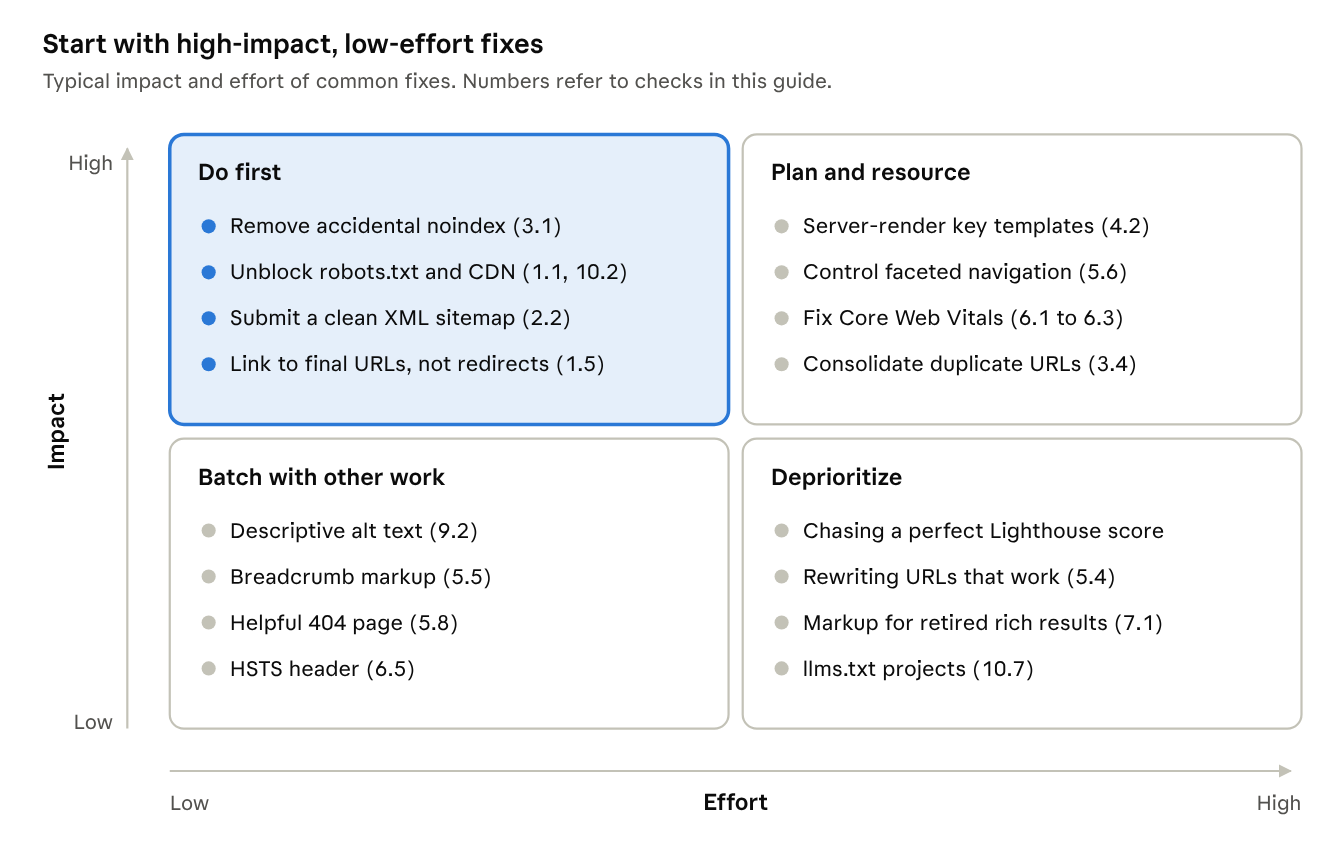
Work the top-left box first: those fixes take hours, not sprints, and they unblock crawling and indexing. The bottom-right box feels productive but rarely moves traffic.
A maintenance rhythm that matches how often you ship
Audit frequency should follow your release frequency, not the calendar. A SaaS site that deploys daily needs automated checks after every release, while a brochure site that rarely changes can live with a quarterly review.
| When | What to check |
|---|---|
| After every deploy | robots.txt, robots meta and canonicals on key templates, and status codes for your top 100 URLs (automate it with a scheduled crawl or a CI test) |
| Weekly | Search Console alerts, Page indexing trends, Crawl stats host status, uptime monitoring |
| Monthly | Full crawl, broken links and redirects, submitted vs indexed, Core Web Vitals report, AI crawler activity, Google's Generative AI and Bing's AI Performance reports |
| Quarterly | This full checklist, log file analysis, structured data against Google's current gallery, and a review of your robots.txt and CDN AI policy |
| Before any migration or redesign | Section 12, start to finish |
Myths that waste audit time
| Myth | What's actually true |
|---|---|
| "Every redirect hop leaks link equity" | Google says permanent redirects don't cause a loss in PageRank. Flatten chains anyway, for speed and crawl efficiency. |
| "Structured data gets pages indexed faster" | Google presents it as a way to become eligible for rich results, with no guarantee, not as an indexing signal. |
| "Sitemap priority tells Google what matters" | Google ignores <priority> and <changefreq>. |
| "Every site needs crawl budget work" | Google's guide targets sites with a million-plus pages, or 10,000+ pages that change daily. |
| "robots.txt keeps pages out of Google" | It controls crawling. Use noindex to keep pages out of the index. |
| "A perfect Lighthouse score boosts rankings" | Google says chasing a perfect score just for SEO "may not be the best use of your time." Real-user data is what counts. |
| "Alt text must stay under 100 characters" | Google sets no limit. Describe the image accurately and stop. |
| "AI search needs an llms.txt file" | Google says its AI features need no special files, and Google's John Mueller calls the benefits of llms.txt "purely speculative." |
Quick-reference checklist: all 67 checks
Copy this table into your audit sheet, then add columns for owner, status and due date.
| # | Check | Priority | Where to check |
|---|---|---|---|
| 1.1 | robots.txt loads cleanly and blocks only low-value areas | P1 | robots.txt report, crawler |
| 1.2 | robots.txt isn't used to keep pages out of Google | P1 | Page indexing |
| 1.3 | Server answers reliably and quickly | P1 | Crawl stats, uptime monitor |
| 1.4 | Every URL returns the right status code | P1 | Crawler, Page indexing |
| 1.5 | Redirects are one hop and loop-free | P2 | Crawler |
| 1.6 | Crawl budget under control (large sites) | P2 | Crawl stats, logs |
| 1.7 | HTML well under Googlebot's 2MB limit | P2 | Crawler size column |
| 1.8 | Logs confirm what bots actually do | P3 | Server or CDN logs |
| 2.1 | Sitemap exists and is submitted | P2 | Search Console, Bing Webmaster Tools |
| 2.2 | Sitemap lists only canonical, indexable 200 URLs | P2 | Crawler list mode |
| 2.3 | Files under 50,000 URLs or 50MB, split by type | P3 | Sitemap files |
| 2.4 | lastmod reflects real changes | P3 | Spot check |
| 2.5 | Submitted vs indexed tracked per sitemap | P2 | Sitemaps report |
| 3.1 | No accidental noindex | P1 | Crawler, Page indexing |
| 3.2 | Canonicals present, absolute and consistent | P1 | Crawler |
| 3.3 | Google agrees with your canonical | P2 | URL Inspection |
| 3.4 | Every page lives at one URL only | P1 | Header checker, crawler |
| 3.5 | Page indexing report triaged | P1 | Page indexing |
| 3.6 | Thin and low-value pages handled on purpose | P2 | Crawler, Performance report |
| 3.7 | PDFs and other files controlled | P3 | site: search, HTTP headers |
| 4.1 | Critical content in the rendered HTML | P1 | URL Inspection |
| 4.2 | Key content works without JavaScript | P1 | DevTools, view-source |
| 4.3 | Links are real <a href> elements | P1 | Crawler with JS on and off |
| 4.4 | JavaScript never changes robots or canonical tags | P1 | Source vs rendered HTML |
| 4.5 | Every rankable view has a real URL | P2 | Manual check |
| 4.6 | Lazy-loaded content appears without interaction | P2 | URL Inspection |
| 4.7 | Mobile and desktop carry the same content | P1 | Crawler, smartphone vs desktop |
| 5.1 | Key pages within about three clicks | P2 | Crawl depth report |
| 5.2 | No orphan pages | P2 | Crawler, sitemap, Search Console |
| 5.3 | Descriptive anchors that point to final URLs | P3 | Crawler |
| 5.4 | Clean, readable, stable URLs | P3 | Crawler |
| 5.5 | Breadcrumbs with valid markup | P3 | Rich Results Test |
| 5.6 | Faceted navigation can't spawn endless URLs | P1 ecommerce | Crawler, logs |
| 5.7 | Pagination is crawlable | P2 | Manual check |
| 5.8 | Helpful 404 page that returns a real 404 | P3 | Manual check |
| 6.1 | LCP of 2.5 s or less | P2 | PageSpeed Insights, Core Web Vitals report |
| 6.2 | INP of 200 ms or less | P2 | PageSpeed Insights, DevTools |
| 6.3 | CLS of 0.1 or less | P2 | PageSpeed Insights |
| 6.4 | TTFB of 0.8 s or less | P2 | PageSpeed Insights, Crawl stats |
| 6.5 | HTTPS everywhere, no mixed content | P1 | Crawler, browser console |
| 6.6 | Certificate renewal automated | P2 | Host or CDN settings |
| 6.7 | No intrusive interstitials or ad clutter | P3 | Mobile spot check |
| 6.8 | Security and Manual actions reports clean | P1 | Search Console |
| 7.1 | Each template carries the markup that fits it | P2 | Schema Markup Validator |
| 7.2 | Markup validates with zero errors | P2 | Rich Results Test, Search Console |
| 7.3 | Every marked-up fact is visible | P1 | Manual comparison |
| 7.4 | Organization and WebSite markup in place | P3 | Rich Results Test |
| 7.5 | JSON-LD in the initial HTML | P2 | View-source |
| 8.1 | hreflang reciprocal and self-referencing | P2 | Crawler |
| 8.2 | Valid language and region codes | P2 | Crawler export |
| 8.3 | x-default set for every cluster | P3 | Crawler |
| 8.4 | hreflang URLs canonical, indexable, 200 | P2 | Crawler |
| 8.5 | No forced redirects by location | P2 | VPN test |
| 9.1 | Content images use <img> with a real src | P2 | Inspect element |
| 9.2 | Alt text describes the image | P3 | Crawler |
| 9.3 | Images modern, responsive and sized | P2 | PageSpeed Insights |
| 9.4 | Hero image loads first, never lazy | P2 | PageSpeed Insights |
| 9.5 | CDN images crawlable | P3 | CDN robots.txt |
| 9.6 | Key videos have watch pages | P3 | Video pages report |
| 10.1 | Every AI crawler allowed or blocked on purpose | P1 | robots.txt, logs |
| 10.2 | CDN and firewall match robots.txt | P1 | CDN settings, logs |
| 10.3 | Content you want cited is in the raw HTML | P1 | JavaScript-off test |
| 10.4 | AI crawlers don't hit dead URLs | P2 | Logs |
| 10.5 | Google's AI settings set on purpose | P2 | Search Console settings |
| 10.6 | Bing Webmaster Tools and IndexNow set up | P2 | Bing Webmaster Tools |
| 10.7 | llms.txt kept in proportion | P3 | Sprint backlog |
| 10.8 | AI visibility measured monthly | P3 | Search Console, Bing, analytics, logs |
Technical SEO checklist FAQs
What is a technical SEO checklist?
It is a list of checks that confirm search engines and AI crawlers can reach, render, index and understand your site. It covers crawl access, indexing controls, rendering, site structure, speed, security, structured data and international setup. Content quality and backlinks sit outside it.
How often should you run a technical SEO audit?
Match it to how often you ship. Automate a small check after every deploy, review Search Console weekly, crawl the site monthly, and run this full checklist every quarter and before any migration or redesign.
What are the most important technical SEO checks in 2026?
The P1 items. Make sure robots.txt and CDN settings don't block important pages or crawlers, there's no accidental noindex, status codes are correct and every page has one canonical URL. Mobile and desktop content must match, and key content must be in the HTML your server sends.
Is technical SEO different for AI search?
The foundation is the same, with less room for error. Google's AI Overviews and AI Mode follow normal indexing rules. ChatGPT, Claude and Perplexity use their own crawlers, which need explicit robots.txt access, rarely run JavaScript and are often caught by CDN bot settings.
Do Core Web Vitals still affect rankings?
Yes, but modestly. Google says its ranking systems use Core Web Vitals, yet good scores don't guarantee top positions and relevance comes first. Aim for "good" at the 75th percentile on mobile, then spend the rest of your effort on content and links.
Can I do technical SEO without a developer?
You can find almost every issue in this checklist with free tools and no code. Fixing them is another matter. robots.txt, redirects, sitemaps and CMS settings are usually within a marketer's reach, while rendering, Core Web Vitals and faceted navigation fixes typically need a developer.
Are backlinks part of technical SEO?
No, backlinks are off-page SEO, but technical problems decide how much value they deliver. Links that land on 404 pages, redirect chains or non-canonical URLs are wasted. Make sure your most-linked pages return 200, and redirect old linked URLs to their closest live equivalent.
Where to start today
Technical SEO isn't about chasing scores. It's about removing every reason a search engine or AI system can't reach, read or trust your pages. If you only have an afternoon, do this:
- Record your baseline from the "How to use this checklist" section.
- Clear every P1 check on your 20 most valuable pages, starting with sections 1, 3, 4 and 10.
- Automate the after-deploy checks from section 13, so the fixes stay fixed.
Then work down the P2 list one template at a time, and re-run the full checklist every quarter.
Technical SEO is the foundation. Links do the lifting.
Once crawlers can reach, render and index your pages, authority decides who ranks. That is where SaaS link building comes in: relevant, editorial backlinks pointing at the pages you just fixed. See how this played out for real brands in our link building case studies, from a brand-new AI tool that went from 3 to 191 monthly visits to enterprise security brands.
Running an agency? Our white label link building service handles fulfillment under your brand. Ready to start? Compare our monthly link building packages or talk to the SaaSLinkify team.
Written by
SaaSLinkify Team
SaaSLinkify Team writes about SaaS link building, digital PR and organic growth at SaaSLinkify.